The order tracker behind Ube MKE
Every paid bakery order lands in a board we bake from. It grew into the bakery's back end, and that inspired Cottage Kit.
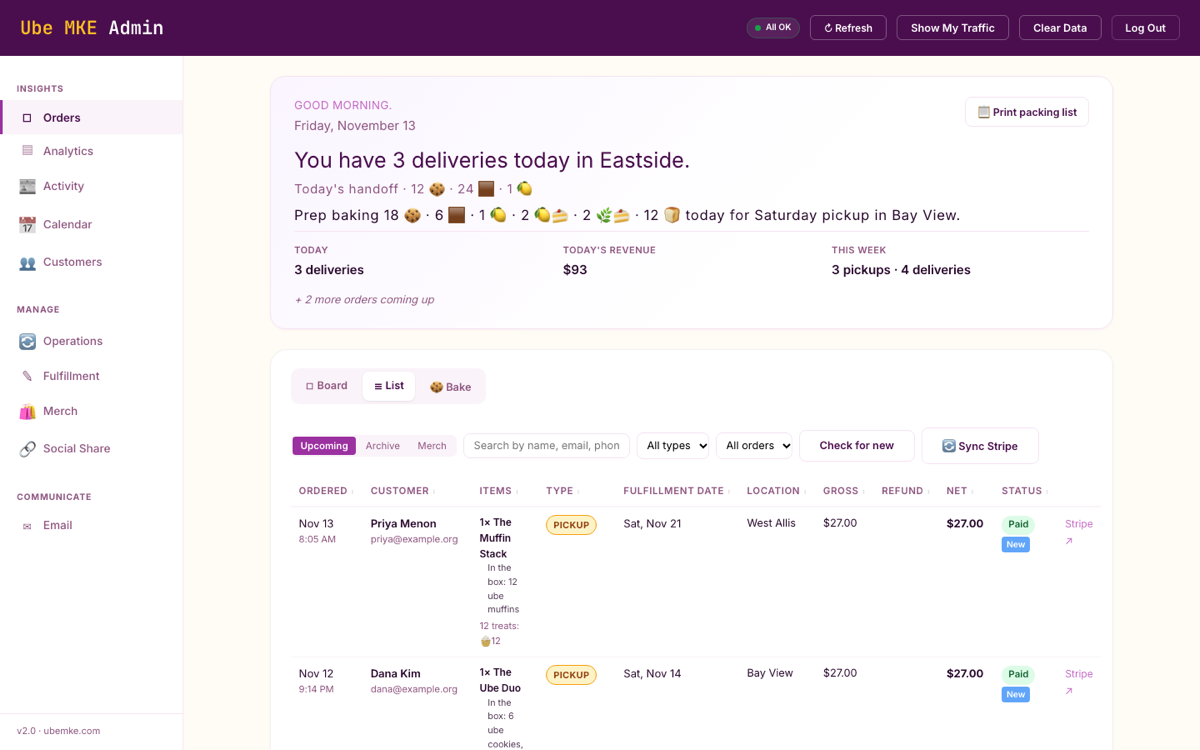
The order tracker behind Ube MKE
The Setup
Orders come in through the bakery’s website, and Stripe takes the payment. After that, somebody has to know there’s an order: what’s in it, when it’s wanted, and whether it’s a pickup or a delivery.
The Build
We built that into the bakery’s own admin. When a payment clears, the order shows up there by itself. I can look at orders as a board, a list or a calendar, and each one moves along until it’s handed over.
A kitchen view adds up the week’s orders into a bake plan, so we know how many batches to make. Reminders go out on their own the day before a pickup and again that morning. And when a new paid order comes in, our Google Home announces it and it lands on the calendar.
The Result
Nobody copies an order from one place to another. We bake from the same list the customer paid into.
What It Turned Into
The order tracker kept growing until it was the bakery’s whole back end, with customer records and sales numbers next to the orders. That back end is what inspired Cottage Kit, which is the same idea opened up for other home bakers.
How It’s Built
- Payments: Stripe checkout
- Orders: created when Stripe confirms the payment, and kept in the bakery’s own database
- Admin: board, list and calendar views, plus a kitchen bake plan
- Extras: pickup reminders, a Google Home announcement and a calendar entry for each new paid order